Understand revisions and ECOs
GitM separates two kinds of "version":
- A version (Cx) is an automatic content checkpoint — every check-in creates one. They are cheap, frequent, and numbered per file (C1, C2, C3…). See Versions and snapshots.
- A revision (Rev A, B, C…) is a deliberate, controlled release of a part. It marks a specific version as "this is an official issue of the part" and is governed by rules.
Revisions are gated by ECOs (Engineering Change Orders) so that, after the first release, a part can't be re-revised without a documented, approved reason.
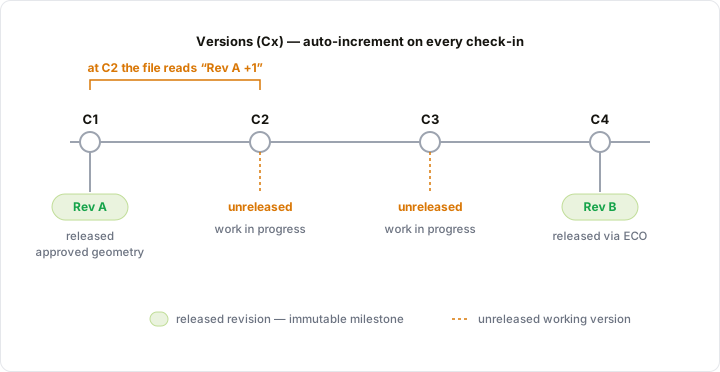
Versions increment on every check-in; a revision pins to one specific version and stays there. Rev A is C1's approved geometry — it doesn't move when you keep editing. Those later versions (C2, C3) are unreleased work ahead of the release, which is why the file reads "Rev A +1". The next revision (Rev B) is pinned only when it's released through an ECO.
Revisions (Rev A, B, C…)
A revision is stamped on one specific version of one source file (parts, assemblies, drawings). When you Release a file, GitM records the next revision letter against the file's current checked-in content.
- The first release is free — it becomes Rev A with no paperwork.
- Every later release requires an approved ECO that names the file.
- Only the latest checked-in version can be released, and only when the file is not checked out. Release captures a stable, published state — not work in progress.
- Release permission is restricted. Not everyone who can check a file in can release it. Releasers are named in Settings → Release Control; repository Admins and the Owner can always release.
Releasing is metadata only — it writes to .gitm/revisions.json; it does not change the
file's bytes. (GitM can later stamp the revision letter into the SolidWorks custom property.)
Because it's metadata, releasing can be done from either the GitM add-in or
GitMCloud — so someone without SolidWorks installed can release.
The Rev badge
Source files show a Rev badge next to their version coordinate, in both GitM and GitMCloud:
| Badge | Meaning |
|---|---|
| Rev B (green) | The file's current content is released as Rev B. |
| Rev B +2 (amber) | Released at Rev B, but there are 2 newer versions not yet released. |
| (no badge / —) | The file has never been released. |
The same coordinate appears in the BOM, so a bill of materials shows each part's released revision and whether it carries unreleased changes.
How revision letters are chosen
The scheme is set per repository in Settings → Release Control:
- ASME Y14.35 (default) — A, B, …, H, J, K, …, Y, then AA, AB… (skips I, O, Q, S, X, Z).
- Simple A–Z — plain alphabetical, then AA.
ECOs (Engineering Change Orders)
An ECO is a structured record, not a file in the vault. It documents why a part is being revised and collects the approvals needed before the revision can be released.
An ECO has:
- An auto-assigned number (ECO-001, ECO-002…),
- A title, a reason code (Safety, Cost reduction, Performance, Error correction, Supplier-driven) and a free-text reason,
- One or more affected files,
- A requestor (whoever opened it) and a list of approvers,
- A status: In review → Approved → Awaiting release → Closed, with two terminal outcomes — Rejected (an approver declined) or Cancelled (the change was abandoned).
The rules:
- Anyone (Engineer and above) can open an ECO. Creating it submits it in one step — there is no draft. You must name at least one approver and at least one affected file.
- On submission, every affected file freezes and the approvers are notified. An ECO is immutable once submitted — to fix a mistake, reject or cancel it and open a new one.
- Approvers are chosen per ECO, not by a system-wide role, and approval is unanimous — every named approver must approve before the ECO becomes Approved.
- A rejection is final (status Rejected); the rejecter's note is kept in the history.
- When the ECO is Approved, its files unfreeze for the requestor, who checks each one out, makes the change, and checks it back in. Files checked out under an ECO carry an ECO badge.
- The requestor then clicks Submit for release (a whole-ECO action). GitM checks that every affected file has a new version since approval and blocks with a message if not. The files re-freeze in an awaiting-release state.
- A releaser reviews the summary (each file's current version → proposed Rev) and clicks Release all, which stamps every file's next Rev at once, unfreezes them, and closes the ECO. Or they click Send back (with a comment) to return the files to the editable state.
- Either party can Cancel an in-flight ECO. Cancelling unfreezes the files and returns them to their last released revision without stamping a new Rev; it's blocked while any affected file is still checked out.
Freeze states while an ECO is open
An open ECO freezes its affected files so they can't be changed out of process. There are two visible freeze states, shown as a badge on the file in both GitM and GitMCloud:
| Badge | State | What it means |
|---|---|---|
| ECO-007 · pending (amber) | Pending approval | The ECO is in review; nobody can check the file out. |
| ECO-007 · editable (blue) | Approved | The requestor may check the file out and make the change; others are blocked. |
| ECO-007 · awaiting release (green) | Awaiting release | The change is submitted for release; the file is frozen until it's released or sent back. |
Terminal ECOs (Closed, Cancelled, Rejected) impose no freeze.
Where ECOs live in the apps
- GitM add-in: the ECO icon in the task pane top bar opens a slide-over with the ECO list, detail, and a New-ECO form. Its badge counts ECOs awaiting your approval.
- GitMCloud: the ECO tab does the same in the browser — so quality and manufacturing reviewers who don't have SolidWorks can still open, approve, reject, and close change orders.
The release gate, end to end
The first release of a file (its Rev A) is a direct action — a releaser can release any source file that is checked in, on the latest version, and not checked out. It needs no ECO.
Every later release runs through an ECO's Release all (above). The per-file Release action is therefore offered only for a file's first release; once a file is under an active ECO, its row shows "Release via ECO-nnn" instead.
A first release is available only when all of these hold:
- The file is a source file (parts/assemblies/drawings).
- It is not checked out (not locked by anyone).
- It is checked in and on the latest version (clean, pushed, no pending local versions).
- You are a releaser (or an Admin/Owner).
- The file has no prior release and is not under an active ECO.
If any condition fails, the Release action is disabled and explains why ("Check in first", "Checked out — release after check-in", "Release via ECO-007", and so on).
Related
- Release a revision
- Work with ECOs
- Work with ECOs in GitMCloud
- Configure team settings (Release Control)