Message your team
GitMCloud includes real-time 1:1 direct messaging per repository. Messages are separate from your files and engineering data — they're a people layer for quick coordination without leaving the browser.
Open messaging
Click the Messages button on the right end of the tab strip (blue icon).
- A red dot on the icon means you have unread messages.
- The Messages drawer slides open from the right side of the page.
People list
The left section of the drawer shows your team. Each row has:
- Avatar and display name (or GitHub login if no profile is set).
- A preview of the last message in that conversation.
- A red dot and bold name when there are unread messages.
Click a person's row to open the conversation.
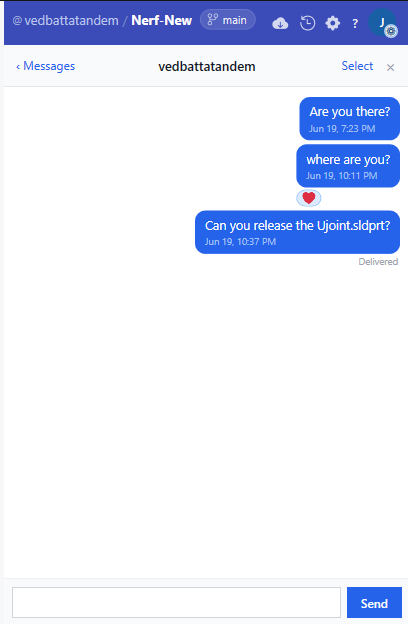
Send a message
Type in the composer at the bottom and press Enter to send. Press Shift + Enter to insert a line break without sending.
The thread scrolls to the latest message automatically.
React to a message
Hover any message and click the 😊 button that appears. A popover shows six emoji:
👍 ❤️ 😂 😮 😢 🎉
Click one to add your reaction. It appears as a chip under the message. Click your own reaction chip again to remove it.
Unsend a message
You can delete your own messages for everyone in the thread:
- Hover your message.
- Click the 🗑 (delete) button.
The message disappears immediately for both sides.
Delete multiple messages
- Click Select in the thread header.
- Checkboxes appear on your messages.
- Tick the messages to remove.
- Click Delete (n) to confirm.
Read receipts
Under the most recent message you sent that the other person has seen, you'll see:
- Delivered — the message reached the server.
- Read — the other person opened the conversation past that message.
Message bubbles
- Blue bubbles — your messages, on the right.
- Grey bubbles — their messages, on the left.
Close the drawer
Click × or anywhere outside the drawer. The drawer hides but stays connected — unread counts update even while it's closed.
Known limitations
- Messaging is 1:1 only in v1. Group channels are planned but not yet shipped.
- Message history is scoped per repository — switching to a different repo shows that repo's threads.