Generate a BOM
GitM can extract a Bill of Materials (BOM) from an assembly and store it in the repository so it can be viewed in the browser through GitMCloud.
The BOM viewer is part of GitMCloud — see GitMCloud docs. GitM generates and stores the BOM; GitMCloud displays it.
Prerequisites
- You are signed in to a repository.
- The assembly (
.sldasm) is available on this PC (not a placeholder). - For the BOM to appear in GitMCloud, you must check in afterwards (see below).
Generate from the Files tab
- In the Files tab, right-click the assembly → Generate BOM.
- GitM extracts the BOM and writes it to
.gitm/bom/<assembly>.json.
Generate / refresh from the BOM tab
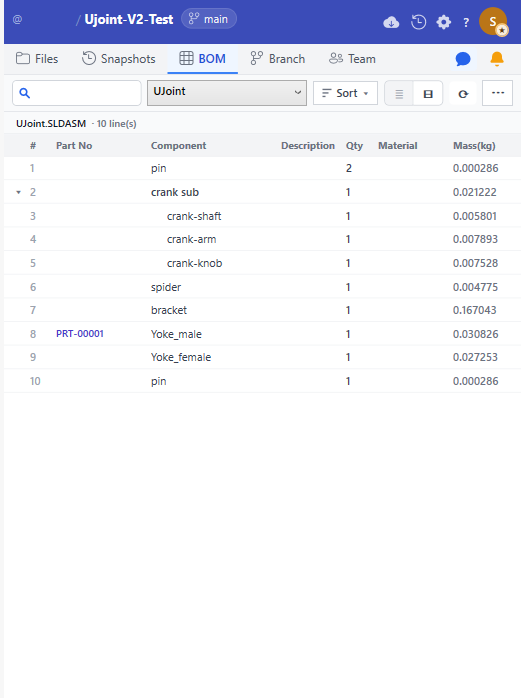
- Open the BOM tab.
- If your repository has more than one assembly, pick one from the assembly dropdown
(fixed width; the
.SLDASMextension is stripped for readability — hover to see the full name). - Click ⟳ on the toolbar to regenerate the BOM from the open assembly.
- To sort the list, click Sort ▼ and pick Line #, Part No, Component, Qty, or Mass. Sort applies to the flat List view only; Tree view stays hierarchical.
- To export, click ⋯ → Export to CSV.
Publish the BOM so the team can see it
A generated BOM is a file change in .gitm/bom/. For GitMCloud (and teammates) to see it,
you must check it in:
- After generating, the BOM JSON shows as a change.
- Check in so the updated BOM is pushed to GitHub.
If you generate a BOM but never check in, it stays only on your machine and GitMCloud won't show the new version.
Expected result
.gitm/bom/<assembly>.jsonis created or updated.- After check-in, the BOM is on GitHub and visible in the GitMCloud viewer.
Troubleshooting
| Symptom | Cause | Fix |
|---|---|---|
| Generate BOM does nothing | The BOM extraction service wasn't available, or the assembly is a placeholder. | Make the assembly available; retry. GitM surfaces an error when extraction is unavailable. |
| BOM tab is empty | No BOM generated yet, or no assembly selected. | Generate one; pick an assembly from the dropdown. |
| GitMCloud shows an old BOM | You generated but didn't check in. | Check in the BOM change. |
Known limitations
- BOM was marked out of scope in the original PRD but is shipped.
- The BOM JSON schema (
BomDocument/BomLine) is a shared contract with GitMCloud. It can change between versions; if the viewer looks wrong, check that GitM and GitMCloud versions are compatible. - GitMCloud never writes BOM files — generation always requires SolidWorks + GitM.