Settings reference
Every tab and field in the Settings dialog ( ). The shipped tabs are Repository,
Account, Preferences, Team & Sharing, Diagnostics.
). The shipped tabs are Repository,
Account, Preferences, Team & Sharing, Diagnostics.
On the longer tabs (Preferences and Team & Sharing) the fields are organised into collapsible sections — click a section header to expand or collapse it. All sections start collapsed, so the tab opens short; expand the one you need.
Repository
Scope: only this device.
| Field / action | Meaning |
|---|---|
| Active repository | The repo GitM is currently working with. Pick another previously-connected repo from the list to switch (with an open-document safety check). |
| + Add New… | Launches the wizard's connect/create flow and adds a repo. |
| Local Path | Path on disk for the active repo (read-only). |
| Remote | The GitHub URL, e.g. https://github.com/org/repo.git (read-only). |
| Branch | The branch GitM treats as the main line (read-only). |
| View on GitHub ↗ | Opens the active repo's GitHub page in your browser. Shown only when the remote is a GitHub URL. |
| Repository Nickname | An editable display name for the active repo, shown in the repository list. Only the label changes — the repo's identity is unchanged. Saved when you click Save. |
Account
Scope: your account (the connected GitHub account is global). Commit Identity is per-device.
| Field / action | Meaning |
|---|---|
| Connected account | Your GitHub login and the auth method in use (Git Credential Manager or Personal Access Token). Tokens are stored encrypted in Windows Credential Manager (DPAPI), never in plain JSON. |
| Verify Now | Checks your stored credentials still work against GitHub. |
| Switch Account | Re-runs sign-in to connect a different GitHub account. Warns first if you have files checked out — they stay locked to the current account. Also on the header switcher menu (Switch account…). |
| Disconnect | Removes the stored credential for this account. |
| Edit Profile… | Opens the Profile dialog to set your display name, optional contact email, and avatar. Profile data is separate from git commit identity. See Set up your profile. |
| Commit Identity | By default commits are authored as your GitHub account. Tick Use a different identity for commits to override user.name / user.email (pre-filled from global git config if present). Stored per-machine. |
Preferences
Scope: only this device. Grouped into collapsible sections.
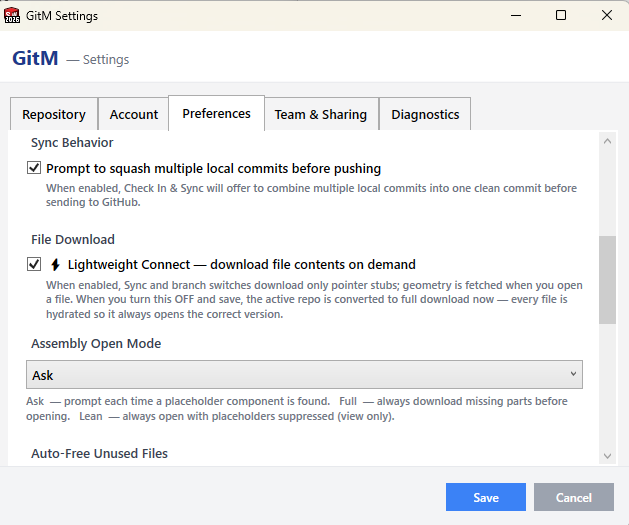
Locking and awareness
| Field | Meaning |
|---|---|
| Lock File On Open | Always / Prompt / Never. Recommended: require an explicit Check Out before editing, so people don't silently lock files just by opening them. |
| Warn when an open SolidWorks file is outside this repository | Shows a banner when the file you're editing lives outside the active repo, so you don't edit an untracked copy by mistake. Never blocks; just informs. |
Check-in
| Field | Meaning |
|---|---|
| Default Description Template | Default text for the check-in description (commit message), with tokens like {branch}, {summary}. |
| Include drawings when checking in models | Whether to include related drawings when checking in models. |
| Walk assembly references on check-in | Yes / Ask / No. |
| Prompt to squash multiple local commits before pushing | When enabled, Check In & Sync offers to collapse multiple local commits into one clean commit before sending to GitHub. |
File download
| Field | Meaning |
|---|---|
| Lightweight Connect | Download file contents on demand rather than on connect. When turned off and saved, the active repo is fully hydrated immediately so every file opens the correct version. |
| Assembly Open Mode | Ask / Full / Lean — how to handle opening assemblies that contain placeholder components. |
| Auto-Free Unused Files | Currently disabled while hydration is being reworked. |
Updates
| Field | Meaning |
|---|---|
| Check for Updates | Off / Every 1 minute / Every 5 minutes (recommended) / Every 15 minutes. Drives a background read-only fetch that checks GitHub for new content files and updates the count badge on the Get Latest icon. Never downloads files — Get Latest does that. Default: every 5 minutes. |
Storage
| Field / action | Meaning |
|---|---|
| Version Retention | How many snapshots' LFS objects to keep locally. Older snapshots remain on GitHub but aren't cached locally. |
| Automatically prune local LFS cache after publishing | Whether to prune old LFS objects automatically after publishing to the cloud. |
| Local LFS Cache size | Shows current disk usage; click Refresh to measure. |
| Prune LFS Cache Now | Remove LFS object data for snapshots older than your retention limit. Commits and tags remain; only the local file cache is trimmed. |
Team & Sharing
Scope: everyone in this repo. Editing requires Admin or Maintainer role; everyone else sees these sections read-only. Grouped into collapsible sections under two headings — Repository policy (File policy, Part numbers, Release control) and Collaboration (Library sources, Supplier exchange).
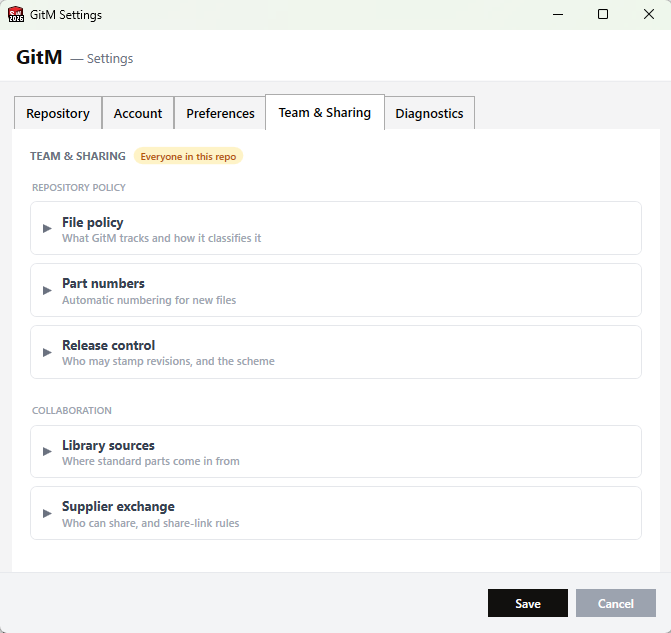
File Policy
Defines which file types GitM tracks and how it classifies them into
buckets.
Saved to the shared .gitm/repo-config.json and applied to everyone in the repo on their next
pull. Each field is a comma-separated list.
| Field | Meaning |
|---|---|
| Source (native SolidWorks) | Extensions that are locked on check-out, part-numbered, and in the BOM. Changing this affects locking — edit with care. |
| Derived (neutral / 2D exports) | Extensions tracked as derived outputs (not lockable, no part number). |
| Documents | Document extensions (binary → LFS, .txt/.md/.csv → plain git). |
| Images | Image extensions (LFS). |
| Library folders (read-only reference) | Folder prefixes whose contents are treated as read-only reference, regardless of file type. Default Library/. |
Part Numbers
| Field | Meaning |
|---|---|
| Auto-assign part numbers on check-in | When enabled, files checked in without a part number receive one automatically. When off, use # Assign Part Nos to assign on demand. See Manage part numbers. |
Release Control
Governs who can stamp revisions, saved to the shared .gitm/release-config.json (read by both
GitM and GitMCloud). See Understand revisions and ECOs.
| Field | Meaning |
|---|---|
| Releasers | GitHub logins allowed to Release a file (stamp the next revision). Repository Admins and the Owner can always release, so an empty list means "only admins/owner release." |
| Revision scheme | How revision letters increment: ASME Y14.35 (skips I, O, Q, S, X, Z; the default) or Simple A–Z then AA. |
Library Sources (Git)
Defines GitHub repos the team can copy standard parts from. They appear in the
Add Library Part dialog for everyone, saved to the shared
.gitm/library-sources.json. (Local-folder sources are per-machine and added in that dialog
instead.)
| Field / action | Meaning |
|---|---|
| Existing sources list | Each configured Git source (name + owner/repo/subfolder) with Remove. |
| A repo in this account | Load lists your account's repos; pick one as the source. |
| …or search public repos | Search GitHub's public repos and pick a result. |
| Library name | The Library/<name>/ subfolder the parts copy into. |
| Branch / Subfolder (optional) | Pin a branch/tag, and/or limit to a folder within the source repo. |
| Add source / Save | Add source stages it; Save writes the shared list to GitHub. |
Supplier Exchange → Sharing policy
Controls supplier share links for the repo, saved to the shared .gitm/exchange-config.json
and applied to everyone. Installing or removing the Supplier Exchange app itself is managed in
GitMCloud (the web app); GitM shows a read-only note to that effect.
See Share files with a supplier.
| Field | Meaning |
|---|---|
| Roles allowed to create share links | Engineer / Manager / Administrator / Owner checkboxes. Only checked roles see the Share button. |
| Allow sharing native SolidWorks files | When off, .sldprt/.sldasm (and other source files) are excluded from shares; derived/document/image files are always shareable by allowed roles. |
| Require a password on every share | Forces a password on each generated link. |
| Default expiry | The expiry pre-selected in the Share dialog (7 / 30 / 90 days). |
| Maximum expiry (cap) | The longest expiry a sharer may choose (7 / 30 / 90 days / 1 year / No cap). Longer options are removed from the Share dialog. |
Diagnostics
Scope: only this device.
A list of system checks with green/amber/red status:
- Git installed, Git LFS installed, LFS hooks registered.
- Local path is a valid repo, remote reachable, authentication working.
.gitattributeshas LFS + lockable rules for SolidWorks extensions.- Open SolidWorks documents inside the working copy (relevant to branch/repo switches).
Actions: Run All Checks, Export Diagnostics (sanitized report, no token).
Advanced (settings.json only)
These fields are not exposed in the Settings dialog. Edit %APPDATA%\GitM\settings.json directly
to change them. Incorrect values fall back to today's manual-refresh behavior — they cannot crash
the add-in.
| Field | Default | Meaning |
|---|---|---|
RealtimeSyncEnabled |
true |
Kill-switch for the Firebase realtime doorbell. Set false to disable live refresh and return to manual-refresh-only behavior. |
RealtimeDbUrl |
https://gitmcloud-default-rtdb.firebaseio.com |
URL of the Firebase Realtime Database instance. Change only if you have migrated to a different Firebase project. |
Notes
- Per-user settings persist in
%APPDATA%\GitM\settings.json. Shared team conventions live in the repo's.gitm.jsonand the.gitm/*.jsonpolicy files — see Configure team settings.
Known limitations
- The original PRD described separate File Types and Profiles tabs. The shipped UI does
not have those as standalone tabs (file-type/tracking lives in Team & Sharing → File Policy,
and profile concerns are handled via the Account tab,
.gitm.json, and the wizard).